Using District Data to Personalize Your Outreach (Without Being Creepy)
What to reference, what to skip, and how to make data-driven personalization feel human.

You've done your research. You know the district has 12,000 students, 47% free and reduced lunch, a new superintendent who started last July, reading proficiency 8 points below state average, and just passed a technology bond.
Now what?
The temptation is to cram all of that context into your opening email, proving you've done your homework. But there's a fine line between "prepared" and "surveillance-y." Cross it, and your personalization backfires.
This article covers how to use district data to personalize outreach in ways that feel relevant and helpful—not invasive or performative.
The Personalization Spectrum
Think of personalization on a spectrum:
Generic → Researched → Relevant → Creepy
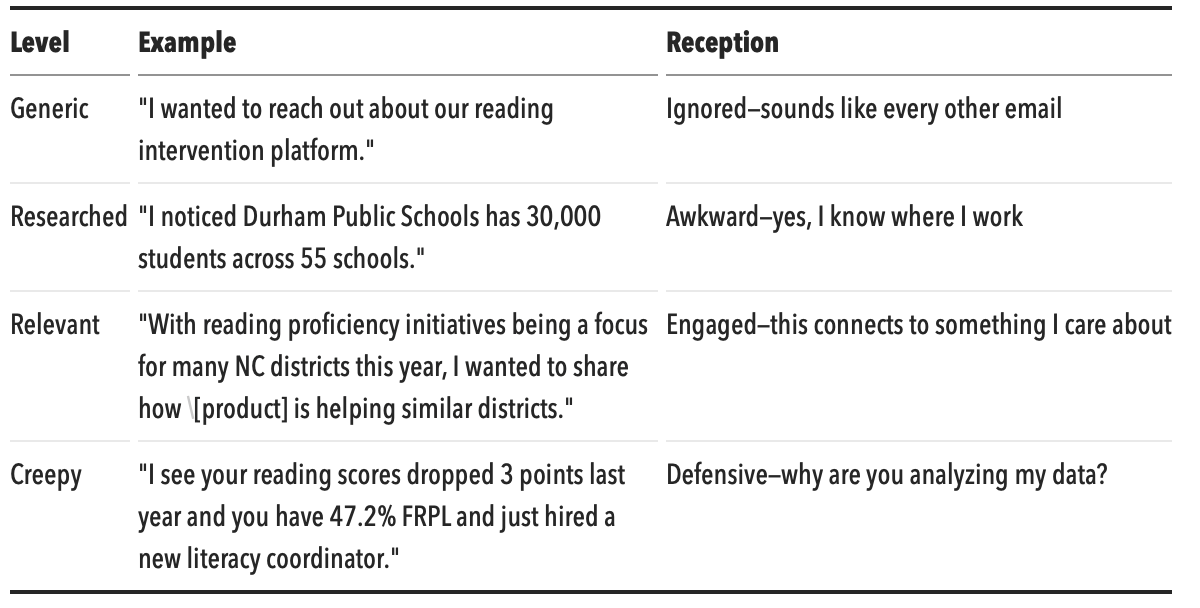
Your goal is to live in the "Relevant" zone—demonstrating context without reciting a data sheet.
The Golden Rule: Connect Data to Their Priorities
The best personalization isn't about showing what you know. It's about connecting what you know to what they care about.
Don't: Lead with data pointsDo: Lead with implications that matter to them
Example transformation:
❌ "I saw that your district has 8,500 students with 52% FRPL and per-pupil spending of $11,200."
✓ "I know Title I districts like yours are often looking for intervention solutions that can demonstrate measurable outcomes. That's exactly what we've focused on with [product]."
The first version recites their demographics back at them (they know their demographics). The second version shows you understand what those demographics mean for their priorities.
What to Reference: High-Value Personalization Signals
Some data points translate into strong personalization. Others don't. Here's what works:
Strong: Recent Events and Initiatives
Why it works: Shows you're paying attention to their current world, not just their static profile.
Examples:
- "Congratulations on the passage of your technology bond last month—I imagine you're thinking through implementation priorities."
- "I saw your district just launched a focus on early literacy. That aligns closely with what we've been helping districts achieve."
- "With your new strategic plan emphasizing college readiness, I wanted to share how districts with similar goals are approaching..."
Where to find it: District website news, Google News alerts, board meeting agendas/minutes.
Strong: Strategic Priorities They've Published
Why it works: References what they've explicitly said they care about—you're responding to their agenda, not imposing yours.
Examples:
- "Your strategic plan mentions closing achievement gaps as a top priority. That's the core problem we solve."
- "I noticed equity is one of your district's stated values. Our product was designed with that principle in mind."
Where to find it: District strategic plans (usually on website), superintendent messages, school improvement plans.
Strong: Peer Comparisons (Used Carefully)
Why it works: Educators often look to peer districts for benchmarks and ideas. Framing around what similar districts are doing can create relevance.
Examples:
- "We've been working with several other NC districts of similar size—I'd love to share what's working for them."
- "Districts with similar demographics to yours have been seeing strong results with [specific approach]."
Caution: Don't use peer comparisons to imply they're behind or failing. "Districts like yours are struggling with..." is condescending. "Districts like yours are finding success with..." is constructive.
Moderate: Size and Structure Acknowledgment
Why it works: Acknowledging district size shows you understand their operational reality without getting too personal.
Examples:
- "I know with 45 schools across your district, consistency in implementation can be a challenge. That's something we've designed for."
- "Managing a district your size means any new initiative needs to scale. Here's how we approach that..."
Where to find it: Basic district profile data (enrollment, school counts).
Weak: Demographic Statistics
Why it's risky: Reciting their demographic percentages feels clinical and can come across as reducing students to data points.
If you must reference demographics, connect them to a positive framing:
❌ "With 65% low-income students..."
✓ "We've focused specifically on supporting districts serving diverse student populations, where our personalized approach can make the biggest difference."
Avoid: Performance Data as a Lead
Why it's risky: Pointing out low test scores or poor ratings feels like criticism, even when you're trying to offer help.
Never open with: "I noticed your reading proficiency is below state average..."
Instead, reframe: "We specialize in helping districts that are focused on accelerating student growth—particularly in literacy."
The first version says "you have a problem." The second version says "you have priorities we support."
Channel-Specific Personalization
Different outreach channels warrant different levels of personalization:
Personalization level: Moderate. 1-2 relevant references maximum.
Structure that works:
- Opening: One personalized connection point
- Body: What you offer and why it matters
- Close: Clear next step
Example:
Subject: Literacy support for [District Name]Hi [Name],I saw your district recently launched an early literacy initiative—exciting to see that investment in foundational skills.At [Company], we help districts like yours [brief value proposition]. We've been working with several districts in NC with similar literacy goals and seeing strong engagement results.Would you be open to a brief conversation about what's working for others and whether any of it might be relevant for [District]?Best,[Name]
Personalization level: Light. One reference maximum; keep it conversational.
What works:
- Reference a recent post they made
- Mention a mutual connection
- Note a shared event or conference
What doesn't work:
- Reciting their district profile
- Long messages that could have been emails
- Data-heavy openers
Phone/Voicemail
Personalization level: Very light. Name, district, one quick hook.
Example:
"Hi [Name], this is [Your Name] from [Company]. I wanted to quickly connect about literacy support for [District]—we've been working with several NC districts on similar initiatives. Would love 10 minutes to share what we're seeing. I'll follow up with an email as well."
You don't have time for detailed personalization in a voicemail. Save it for the conversation.
Personalization at Scale: Making It Manageable
If you have 200 accounts, you can't hand-craft every message. Here's how to personalize efficiently:
Tier Your Accounts
Tier 1 (High priority, ~20%): Full personalization. Individual research, custom messaging.
Tier 2 (Medium priority, ~30%): Segment-based personalization. Customize by segment characteristics.
Tier 3 (Lower priority, ~50%): Template with merge fields. Basic name/district personalization only.
Create Segment-Based Templates
Group districts by characteristics that matter for your product, then create templates for each segment:
By size:
- Small district template (under 5,000)
- Mid-size district template (5,000-25,000)
- Large district template (25,000+)
By performance profile:
- High-performing district template (enhancement angle)
- Improvement-focused district template (intervention angle)
By demographic focus:
- High ELL population template
- High FRPL population template
By recent trigger:
- New superintendent template
- Bond passage template
- New initiative template
Example segment template (High FRPL, Literacy Focus):
Subject: Literacy results in Title I districtsHi [Name],Districts with significant Title I populations are seeing strong literacy gains with [product]—particularly because [relevant feature or approach].At [District], where early literacy is a priority, I thought the approach might be worth a quick conversation.[Standard CTA]
This feels personalized because it's relevant to their segment, even though you're using it for 20 similar districts.
Use Triggers, Not Just Attributes
Static attributes (enrollment, demographics) are table stakes. Triggers—things that just happened—are higher-value signals:
High-value triggers:
- New superintendent (first 18 months)
- Bond or levy passed
- Strategic plan released
- Initiative announced
- Grant awarded
- Accountability status change
Set up Google Alerts for your key accounts, or build a process to scan for triggers weekly. A timely message about something that just happened beats a polished message about static demographics.
What Never to Reference
Some information, even if publicly available, crosses the line:
Never reference:
- Individual student outcomes or cases
- Specific incidents (violence, scandals, lawsuits)
- Negative board politics or community controversies
- Personal information about employees beyond professional role
- Anything that could be seen as criticism of students, teachers, or community
Example of crossing the line:
❌ "I know your district has been dealing with some community concerns about math curriculum—we might be able to help."
Even if this is public news, leading with controversy makes you look opportunistic, not helpful.
Testing Your Personalization
Before sending, run your message through this checklist:
✓ Is the reference relevant to what they care about? (Not just what you found)
✓ Would they be glad you noticed this? (Positive or neutral, not embarrassing)
✓ Are you leading with their priority, not your data? (Implications, not statistics)
✓ Would this work in conversation? (If it sounds weird said aloud, rewrite it)
✓ Are you referencing only publicly appropriate information? (Nothing that feels like snooping)
If any answer is no, revise or remove the personalization.
The Authenticity Test
Ultimately, good personalization passes the authenticity test: Would a human who genuinely cared about helping this district write it this way?
Robots cite data. Helpful humans make connections.
If your personalization reads like it was generated by concatenating database fields, it's not personalization—it's mail merge with extra steps.
If your personalization reads like something a thoughtful colleague might say after hearing about your situation, you've got it right.
---
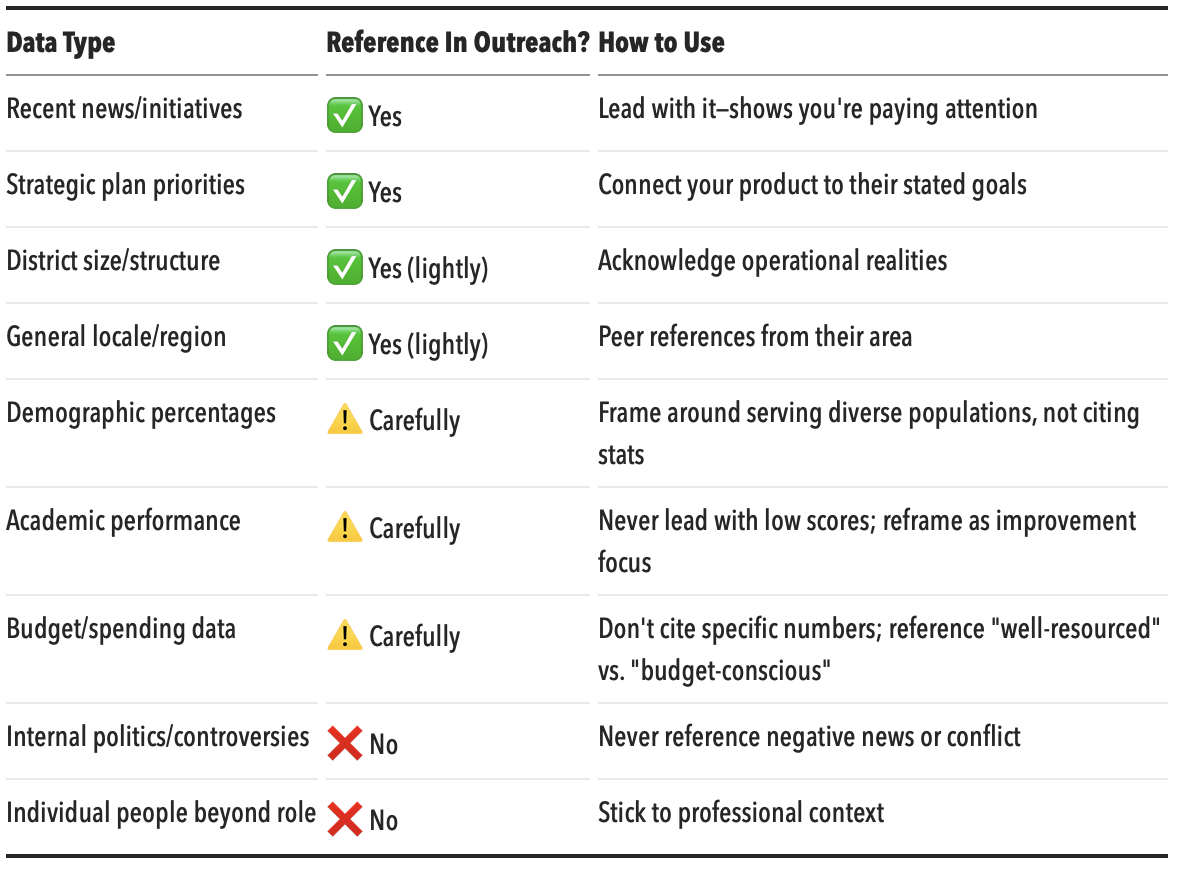
Quick Reference: Personalization Cheat Sheet
---